
GeoShare: Jump Between Maps
An Android app to open map links in other map apps and copy coordinates
An Android app to open map links in other map apps and copy coordinates


Share a map link with GeoShare and the app will open it in another installed map app.
When someone sends you a Google Maps link, but you prefer using OpenStreetMap, you can quickly open the same location in OsmAnd or Organic Maps.
When you like Google Maps for finding places, but you prefer a different app for navigation, you can easily switch from Google Maps to your favorite navigation app.
GeoShare converts map links (e.g. https://maps.app.goo.gl/…) into geo: links that can be opened by other map apps. To create a geo: link, geographic coordinates are required. GeoShare extracts them from the map URL.
However, not all map URLs include coordinates. In such cases, GeoShare will prompt you for permission to connect to the map service (Google Maps, Apple Maps etc.) and retrieve the coordinates from:
Location: https://google.com/maps/@40.78,-73.96,19z<meta property="place:location:latitude" content="40.78">GET https://geocode.googleapis.com/v4/geocode/address/…If you don’t allow connecting to the map service, then GeoShare creates a geo: link with a search term instead of coordinates, or it stops, depending on the particular link.
To permanently allow or deny connecting to the map service instead of always asking (the default), go to the app’s preferences.
GeoShare is able to extract only a place name, e.g. “Mount Kilimanjaro”, from certain map links. When you open this location in another map app, it might show a different place than the original link, because several places with the same name might exist.
Points identified only by name are not included in GPX routes.
When possible, GeoShare converts map links offline. If the map link requires online conversion, the app will ask you before connecting to the map service (Google Maps, Apple Maps, etc.). If you allow the connection, the map service will receive the map link, and it will be able to read your IP address.
For some map links, GeoShare calls a remote server, the open-source GeoShare Server. This server then calls the map service API (e.g. the Google Maps API). GeoShare Server doesn’t keep logs of map links. To apply rate limiting, it stores a public key that identifies your device and separately your IP address for limited time.
For some map links, GeoShare loads the live web page of the map service and executes its JavaScript. This happens in a restricted environment, which blocks tracking scripts and doesn’t store cookies.
GeoShare asks for location permission when launching the TomTom navigation and when sharing a GPX route, because in these cases the app needs to create a GPX route that starts at your current location. The location information is discarded immediately after the creation of the route.
First, go to Settings > Apps > Maps > Open by default and turn off the opening of links in this app.
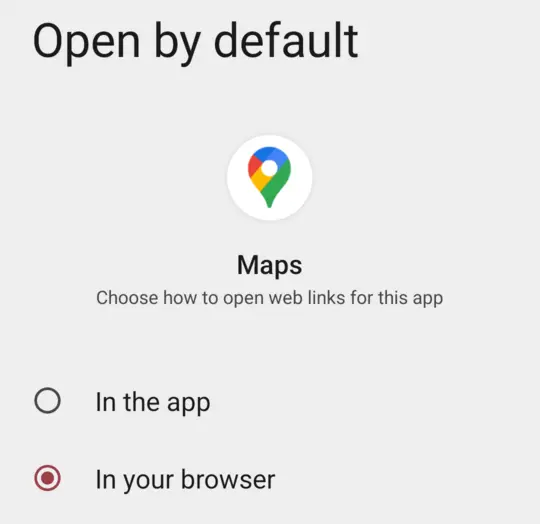
Then go to Settings > Apps > GeoShare > Open by default, turn on the opening of links in this app, and tap Add links.
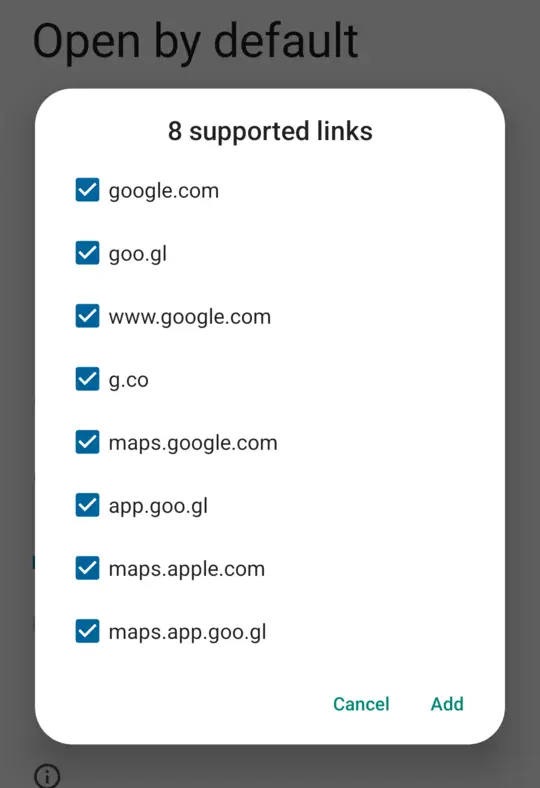
Select maps.app.goog.gl, maps.google.com, and www.google.com. These are the common Google Maps links. You can choose other maps or the more rare links too, but it’s not essential.
If some links are grayed out, other map apps are set to open them by default. You can find these apps and turn off the opening of links for them, like we did for Google Maps. Check also apps installed in private space, if you use this Android feature.
Feel free to remix this project under the terms of the GNU General Public License version 3 or later. See COPYING and NOTICE.
Some components are derived from third-party code under other compatible licenses; see individual subdirectories.
Map data is derived from Natural Earth and Marine Regions.
Flanders Marine Institute (2023). Maritime Boundaries Geodatabase: Maritime Boundaries and Exclusive Economic Zones (200NM), version 12. Available online at https://www.marineregions.org/. https://doi.org/10.14284/632